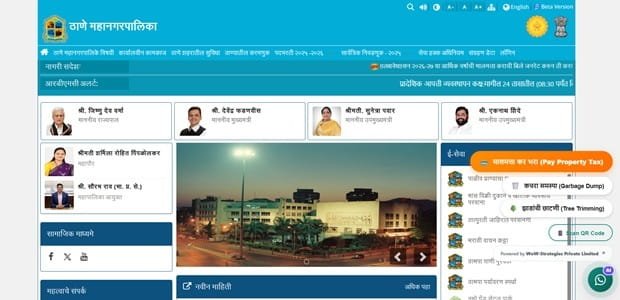
Thane Municipal Corporation (TMC) manages civic services across one of the largest urban centres in the Mumbai Metropolitan Region. Property tax is a major municipal service, and TMC now provides a dedicated online system for searching a property, viewing the bill, paying tax, downloading receipts and accessing a separate registered citizen portal for ongoing property management.
The Thane system is more detailed than a simple bill-payment page. A property can be searched using the Property Number and Sub Code, while the My Property Tax portal uses mobile-based registration and can provide bills, receipts, property-related certificates and alerts. TMC also operates a separate e-KYC facility for limited spelling correction in name/address and for linking contact details.
Quick About Thane Municipal Corporation
| Particular | Details |
| Civic body | Thane Municipal Corporation |
| Main office | Mahapalika Bhavan, Sir Senani General Arunkumar Vaidya Marg, Chandanwadi, Pachpakhadi, Thane – 400602, Maharashtra |
| Main phone | Property-tax helpdesk: 9152818798 |
| Citizen/property-tax support | 9152818798 (property-tax helpdesk) |
| tmchelpdesk@ascentechindia.com | |
| Official website | thanecity.gov.in / propertytax.thanecity.gov.in |
| Key property-tax identifier | Property Number + Sub Code |
| Major online property-tax services | Search property-tax bill by Property Number/Sub Code or owner details, Pay property tax online, Download receipt using OTP verification, My Property Tax citizen portal, Download bills and property-related certificates |
Thane Municipal Corporation Head Office Address
The main municipal office is located at Mahapalika Bhavan, Sir Senani General Arunkumar Vaidya Marg, Chandanwadi, Pachpakhadi, Thane – 400602, Maharashtra. Citizens who need document verification, property-record correction or assistance beyond routine online payment can approach the corporation or the relevant zonal/ward office.
Address: Mahapalika Bhavan, Sir Senani General Arunkumar Vaidya Marg, Chandanwadi, Pachpakhadi, Thane – 400602, Maharashtra
Phone: Property-tax helpdesk: 9152818798
Email: tmchelpdesk@ascentechindia.com
Support: 9152818798 (property-tax helpdesk)
What You Can Do Through TMC Online Services
Thane Municipal Corporation provides a range of online civic services. For property owners, the most useful current facilities include:
- Search property-tax bill by Property Number/Sub Code or owner details
- Pay property tax online
- Download receipt using OTP verification
- My Property Tax citizen portal
- Download bills and property-related certificates
- Property e-KYC for limited spelling correction/contact linking
- Tax calculator and online helpdesk
Individual service pages, payment gateways and annual tax notices can change, so the corporation or state/local-government portal should always be treated as the final point of reference.
TMC Property Tax: How the System Works
TMC property tax is billed against the municipal property record and is payable in half-yearly instalments under the applicable municipal framework. The online portal displays the property account after the Property Number and Sub Code are entered, allowing the citizen to verify the owner name and amount before payment.
TMC publishes financial-year notices and rebate information on the property-tax portal. These offers can change, so a current portal notice should be treated as authoritative rather than a rebate percentage copied from an older article.
Key Property Tax Number or Reference
The main online reference is the Property Number together with its Sub Code. Both are generally available on an existing TMC property-tax bill or receipt. The portal also provides owner-name-based search fields, but the property number/sub-code combination is the safer reference when available.
How to Check TMC Property Tax Bill and Dues Online
- Open propertytax.thanecity.gov.in from the official TMC website.
- Enter the Property Number and Sub Code, or use the available owner-search fields.
- Review the property name, ward/prabhag details and bill amount.
- Check whether previous payments are reflected.
- Proceed only after confirming that the displayed property is correct.
How to Pay Thane Municipal Corporation Property Tax Online
- Search the property account on the TMC property-tax portal.
- Review the bill and outstanding amount.
- Provide the required mobile number and email address.
- Choose PAY NOW and use an available official payment mode such as net banking, card or UPI.
- Wait for the municipal confirmation and save the transaction reference.
- Download the receipt through the receipt facility/OTP process.
Avoid refreshing or closing the page while a payment is processing. If the bank account is debited but the municipal account does not immediately show success, first verify the transaction or contact official support before attempting a second payment.
How to Download or Verify the Property Tax Receipt
TMC’s portal includes receipt download with OTP confirmation to the registered mobile number. If the receipt cannot be retrieved even though the bank shows a successful debit, contact the property-tax helpdesk before paying again.
TMC Login and Citizen Registration Guide
The separate My Property Tax portal uses mobile-number login and supports new user registration. Registration requires contact details and may ask for supporting identification/property documents. Once linked, the portal can be used for bills, receipts, property-related certificates and regular alerts.
Property Record Correction, Mutation and Ownership Changes
TMC’s e-KYC portal is intended for limited spelling correction in name/address and for linking an active mobile/WhatsApp number with the property. A full ownership transfer is a different process and should not be confused with e-KYC spelling correction.
Offline Help and Payment Support
For online property-tax issues, TMC publishes a dedicated helpdesk number and email. Keep the Property Number, Sub Code, mobile number and transaction reference ready when reporting a problem, as these details help the support team locate the correct account.
Frequently Asked Questions
Q. My name is misspelled on the TMC property record. Do I need a full ownership transfer?
Not necessarily. TMC has a separate e-KYC facility specifically for spelling correction in name/address and linking contact details. A change from one legal owner to another is a different municipal process.
Q. I changed my mobile number and cannot download the receipt because OTP goes to the old number. What should I do?
Use the official property-tax helpdesk/e-KYC route to update or resolve the registered contact details. Do not repeatedly create new property accounts just to obtain an OTP.
Q. I know the owner name but not the Property Number/Sub Code. Can I still search?
The portal provides owner-related search fields, but once you locate the correct record, note the Property Number and Sub Code because they are the more reliable identifiers for future bills and payments.
Q. The bank debit succeeded but no TMC receipt was generated. Should I pay again?
No. Contact the helpdesk with the transaction details and first check whether the payment has posted. Duplicate payment can create a longer reconciliation problem.
Q. Can I use the My Property Tax portal without registering every time?
Registered users can log in with their mobile number and manage linked property services. Direct bill search/payment is also available on the main property-tax portal, depending on the service you need.