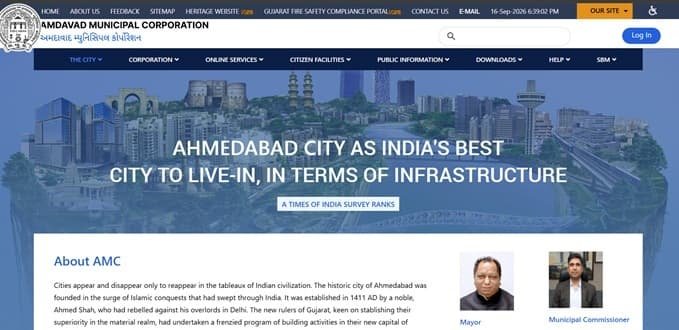
Ahmedabad Municipal Corporation (AMC), also officially styled as Amdavad Municipal Corporation, is the civic body responsible for essential urban services across Ahmedabad. For most property owners, tenants, businesses and residents, the AMC website is especially important for property tax payments, checking dues, downloading receipts, property-related applications, professional tax and several other municipal services.
The online system is useful because many routine property-tax tasks can be completed with a tenement number without visiting an office. Citizens who create an AMC account can also keep multiple property-tax and professional-tax numbers linked under one profile. This guide explains the head-office details, property-tax system, online bill payment, login and registration process, receipt download, corrections, name transfer and practical support options in one place.
Quick About: Ahmedabad Municipal Corporation
| Particular | Details |
| Civic body | Ahmedabad Municipal Corporation (Amdavad Municipal Corporation) |
| Main office | Central Zone Office, Sardar Patel Bhavan, Municipal Corporation, Danapith-Khamasa, Ahmedabad – 380001 |
| Main phone | 079-25391811 |
| Citizen helpline | 155303 |
| Property/Professional Tax online-payment support | +91-9227898608, +91-9227898610 |
| feedback@ahmedabadcity.gov.in | |
| Official website | ahmedabadcity.gov.in |
| Key property-tax identifier | 15-digit tenement number |
| Major online property-tax services | Pay tax, check dues and paid details, display bill, download receipt, tax-due certificate, self-assessment, name-transfer services and application status |
Ahmedabad Municipal Corporation Head Office Address
The central AMC office is located at Sardar Patel Bhavan in the Danapith-Khamasa area of Ahmedabad. Citizens who need administrative help beyond routine online services can use the main office contact number or approach the relevant zonal/civic office for property-specific work.
Address: Central Zone Office, Sardar Patel Bhavan, Municipal Corporation, Danapith-Khamasa, Ahmedabad – 380001
Phone: 079-25391811
Email: feedback@ahmedabadcity.gov.in
Citizen helpline: 155303
For issues specifically connected with online Property Tax or Professional Tax payments, AMC also publishes support numbers +91-9227898608 and +91-9227898610. Citizens are advised to keep the transaction details ready when reporting a payment problem.
What You Can Do Through AMC Online Services
AMC has moved many commonly used civic services online. The Property Tax section includes facilities to pay tax, view dues, check past payments, display the tax bill, download the property-tax receipt, obtain a tax-due certificate, check application status, search using an old tenement number and pay name-transfer fees.
The municipal portal also provides Professional Tax services and selected services related to birth, death and marriage records, building permissions, fire services, hall booking, pet registration and other civic functions. Availability of individual services may change, so the official AMC portal should be used as the final point of reference.
AMC Property Tax: How the System Works
Ahmedabad uses an area-based property-tax assessment system. AMC states that the general tax is linked to the carpet area of the property and four important factors: location, age of the property, type of use and occupancy. Other applicable components, such as water tax, conservancy tax and education-related cess, may also form part of the total amount payable.
This is why two properties with a similar area can still have different tax bills. A self-occupied residential flat, for example, may not be assessed in the same way as a rented commercial property in another location. The bill and online assessment details are therefore more reliable than using a simple per-square-foot estimate.
Where to Find the AMC Tenement Number
The tenement number is the key reference used for AMC property-tax services. The current portal describes it as a 15-digit property identification number, shown in a format similar to 01234567890001T.
You can normally find the tenement number on an existing AMC property-tax bill or an earlier tax receipt. If you have an older property reference, the AMC Property Tax section also provides a facility to search by old tenement number. Owners should verify that the displayed property details match the correct premises before making payment.
How to Check AMC Property Tax Bill and Dues Online
The quickest route is through the Property Tax section of the official AMC website. A separate citizen login is useful for managing linked properties, but the property-tax service itself provides a tenement-number search for dues and paid details.
- Open the official Ahmedabad Municipal Corporation website.
- Go to Online Services and select Property Tax.
- Choose the option for Property Tax Dues, Tax Bill Display or Pay Property Tax, depending on what you need.
- Enter the 15-digit tenement number carefully.
- Use the search option to view current dues or paid details.
- Check the property description, owner/occupier information and outstanding amount before proceeding.
How to Pay Ahmedabad Property Tax Online
AMC provides an online payment facility through its Property Tax service. The exact payment choices displayed by the payment gateway can change over time, so citizens should rely on the options shown on the official checkout page rather than an old list copied from third-party websites.
- Open the AMC Property Tax service and select Pay Property Tax.
- Enter the tenement number and retrieve the property account.
- Review the dues shown for the property.
- Continue to the payment page and choose one of the payment modes currently offered by the official gateway.
- Complete the transaction and wait for the AMC confirmation page.
- Save the transaction reference and download the property-tax receipt after successful payment.
Avoid refreshing the page repeatedly while the payment is being processed. If your bank account is debited but AMC does not immediately show a successful payment, first check the paid-details or receipt section before attempting another payment.
How to Download AMC Property Tax Receipt
A receipt is important for property records, sale or transfer work, loan documentation and future payment disputes. AMC provides a dedicated Download Property Tax Receipt service.
- Open the Property Tax services page.
- Select Download Property Tax Receipt.
- Enter the required tenement or transaction information shown on the page.
- Retrieve the payment record.
- Download or print the receipt and keep a digital copy for future reference.
AMC Login and Citizen Registration Guide
AMC citizen registration is designed for people who want a single profile for municipal tax accounts. The registration page allows a citizen to create a username and password, provide personal and contact information, and opt for notifications. Once registered, property-tax and professional-tax numbers can be linked to the profile.
- Open the AMC website and go to Citizen Registration or the login/profile section.
- Create a username and a password that meets the password rules shown on the portal.
- Enter your name, date of birth, mobile number and email address.
- Fill in the required address details and captcha.
- Complete the verification process as instructed by AMC.
- After login, link your Property Tax and Professional Tax numbers to the account where applicable.
The main advantage of registration is convenience. A person responsible for more than one property can keep multiple tax references under a single login instead of searching each one separately every time.
Useful AMC Property Tax Services at a Glance
- Pay Property Tax
- Check Property Tax Dues
- Check Paid Details
- Display Property Tax Bill
- Download Property Tax Receipt
- Obtain Tax Dues Certificate
- Use Self Assessment facility
- Search by Old Tenement Number
- Check property-tax application status
- Pay Name Transfer Fees
- Download Name Transfer Receipt
- Link mobile number with tenement number
Frequently Asked Questions
Q. My bank account was debited, but AMC still shows the property tax as unpaid. What should I do?
Check the Paid Details and receipt-download sections before paying again. If the transaction is still missing, contact AMC’s online-payment support and provide the tenement number, amount, date and transaction/reference details. This helps avoid an accidental duplicate payment.
Q. The carpet area or use of my property is wrong on the AMC tax record. Can I correct it online by simply editing the bill?
No. Assessment details should not be changed informally. AMC’s property-tax guidance requires an application for correction when the carpet area or an assessment factor is incorrect. Supporting property documents may be needed, so use the prescribed process or approach the appropriate tax office.
Q. I bought a resale property, but the AMC tax bill still shows the previous owner’s name. Is paying the bill enough to update ownership?
Payment of outstanding tax and change of name are separate matters. AMC provides a name-transfer process and a separate facility for name-transfer fees and receipts. The buyer should complete the municipal name-transfer formalities with the required ownership documents.
Q. I have several properties in Ahmedabad. Do I need a separate AMC login for every property?
AMC’s citizen-registration system is designed to let a user link multiple Property Tax and Professional Tax numbers under one profile. This is more convenient for people managing several properties or tax accounts.
Q. What should I do if my old property papers show an older tenement number that does not match the current format?
Use AMC’s Search by Old Tenement No service in the Property Tax section. If the old reference cannot be mapped or the property details appear incorrect, take the old bill/receipt and ownership documents to the relevant AMC tax office or civic centre for verification.