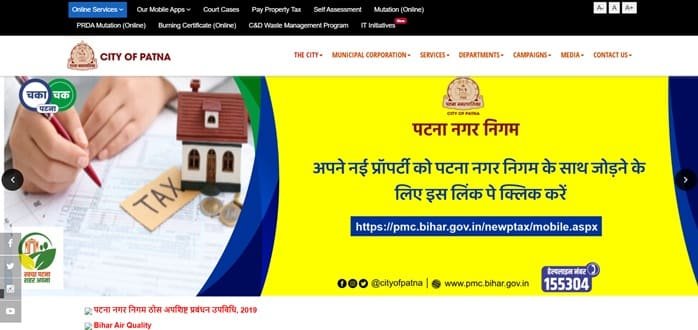
Patna Municipal Corporation (PMC), or Patna Nagar Nigam, administers civic services across Bihar’s capital. Property tax is one of its most important citizen-facing services, and PMC now supports online property search and payment as well as self-assessment, generation of a Property ID, mutation and reassessment. Solid-waste management charges are also linked with the municipal revenue system.
PMC gives property owners more than one way to pay. Tax can be paid through the corporation website, through supported Bharat Bill Payment System channels, or through designated offline counters. For property-tax and SWM disputes, PMC also runs an OTP-based grievance facility. This guide brings together the office details, Property ID search, payment process, assessment, login/verification and serious troubleshooting points.
Quick About: Patna Municipal Corporation
| Particular | Details |
| Civic body | Patna Municipal Corporation (PMC / Patna Nagar Nigam) |
| Main office | Second Floor, Block-C, Maurya Lok Complex, Buddha Marg, Patna, Bihar – 800001 |
| Main phone | 0612-2223791 |
| Property/SWM helpline | 155304 |
| pmcprda@gmail.com; patnamc-bih@gov.in | |
| Official website | pmc.bihar.gov.in |
| Key property-tax identifier | Property ID / PID issued for the assessed property |
| Major property-tax services | New assessment, Property ID generation, online payment, demand, mutation, reassessment and property/SWM grievance |
Patna Municipal Corporation Head Office Address
PMC’s head office is located in the Maurya Lok Complex on Buddha Marg. Property-tax work is also handled through the corporation’s six circles, with collection counters available in the circles and at the headquarters.
Address: Second Floor, Block-C, Maurya Lok Complex, Buddha Marg, Patna, Bihar – 800001
Phone: 0612-2223791
Property/SWM helpline: 155304
PMC Property Tax Services
PMC describes its property-tax system as covering the complete life cycle of an assessed property rather than only annual payment.
- New property assessment
- Generation of a new Property ID
- Online property-tax payment
- Property-tax demand generation
- Mutation after ownership change
- Reassessment when property details change
- Property/SWM tax grievance filing and tracking
What Is the Patna Property ID?
The Property ID, commonly referred to as PID, is the municipal reference used to identify an assessed property and pay holding/property tax. A property that has not been properly assessed may first need the self-assessment/assessment process so PMC can verify the information and issue the property reference.
Do not use another property’s ID merely because the address is similar. Always verify the owner, location and assessment details shown against the PID before making payment.
How to Search Patna Property Tax Details Online
- Open the official Patna Municipal Corporation website.
- Choose Property Tax from the revenue/important links section.
- Enter the numeric Property ID in the property search field.
- Retrieve the property record.
- Review the property and tax information before continuing to payment.
How to Pay PMC Property Tax
PMC allows property tax to be paid online through its website. It also states that citizens can use Bharat Bill Payment System-supported channels such as major UPI/bill-payment apps where the PMC biller is available. The live payment screen should be treated as the final authority for supported payment methods.
- Search the property using the correct Property ID.
- Open the payable demand and check the tax/SWM components shown.
- Choose the official online payment option.
- Complete payment through the available gateway or supported BBPS channel.
- Save the payment confirmation and municipal receipt.
Offline Property Tax Payment in Patna
PMC also accepts property tax through designated offline counters. Counters operate in the six PMC circles and one counter is available at the Maurya Lok headquarters. PMC’s helpline can also guide citizens on authorised collection support. Always insist on an official receipt and verify that the payment is credited to the correct Property ID.
New Assessment and Self-Assessment
A property that is new, unassessed or materially changed may require assessment. PMC allows citizens to submit a Self Assessment Form with property details and supporting documents. The Revenue Officer of the concerned circle verifies the declaration and, where required, the physical property before approving the record and Property ID.
Owners are expected to disclose new construction or other changes that affect the assessment. Continuing to pay against an old description after major construction can create later demand and correction issues.
Mutation and Reassessment
Mutation is required when ownership changes, while reassessment deals with changes in the property or assessment particulars. These are separate from simply clearing outstanding tax. A buyer should therefore confirm that the municipal ownership record is updated after purchase instead of relying only on a tax-paid receipt.
PMC Login and Property/SWM Grievance
PMC’s tax-related grievance portal uses mobile-number verification through OTP. It is intended for property-tax and solid-waste-management tax complaints and allows the applicant to file a grievance and track its status.
- Open the PMC property/SWM grievance portal.
- Enter the 10-digit mobile number.
- Generate and validate the OTP.
- Submit the grievance with the correct Property ID and supporting transaction/property details.
- Use the tracking facility to follow the complaint.
If a Payment Is Debited but Not Reflected
Keep the bank/UPI reference, payment date, amount and Property ID. First confirm whether PMC has posted the receipt. If it has not, use the property/SWM grievance mechanism or helpline 155304. Do not make a second payment solely because the portal did not refresh immediately.
Frequently Asked Questions
Q. My property exists physically but I cannot find a valid PMC Property ID. What should I do?
Do not guess a PID. Use PMC’s assessment/self-assessment process so the property can be verified and a proper Property ID generated or located.
Q. I added a new floor to my building. Can I continue paying the old tax amount?
PMC states that new construction should be declared so the tax record can be updated. Continuing with an outdated assessment can lead to later demand, penalty or reassessment issues.
Q. The tax is paid, but the property is still in the seller’s name. Has ownership been transferred?
No. Tax payment and mutation are separate. Complete the mutation process with the required ownership documents so the municipal record reflects the current owner.
Q. A doorstep collector offers to take my property tax. How can I protect myself?
Use only the collection arrangement officially supported by PMC and insist on an official receipt tied to the correct Property ID. If there is any doubt, confirm through 155304 or pay at an authorised counter/online.
Q. My BBPS/UPI payment succeeded but PMC has not updated the account. Should I repeat it?
No. First preserve the BBPS/UPI reference and check the municipal record. If it remains unposted, file a tax-related grievance or contact the helpline with the transaction details.
Q. Can an incorrect property assessment be solved through the payment page?
No. Payment settles the demand shown; it does not correct the underlying assessment. Use reassessment/circle revenue channels where the area, use or other property details are wrong.