Bidhannagar Municipal Corporation (BMC) administers Salt Lake and adjoining municipal areas in the eastern part of Kolkata, including a mix of planned residential sectors, commercial districts and fast-growing neighbourhoods. For property owners, one of the most frequently used municipal services is property tax, which is handled through a dedicated online system as well as designated tax collection offices and bank branches.
The corporation issues annual property-tax demand notices and allows citizens to check dues, make online payments and review property details using the assessee record linked to the holding. This guide brings together the main office details, current property-tax payment process, online access, mutation and correction points, receipts and practical support options in the same format used for the approved Ahmedabad municipal guide.
Quick About Bidhannagar Municipal Corporation
| Particular | Details |
| Civic body | Bidhannagar Municipal Corporation |
| Main office | Poura Bhawan, FD-415A, Sector III, Salt Lake City, Kolkata, West Bengal – 700106 |
| Main phone | +91 33 2334 0314 |
| Citizen/property-tax support | Grievance: 6292234126 |
| bidhannagar.corporation@gmail.com | |
| Official website | bmcwbgov.in |
| Key property-tax identifier | Assessee Number / holding details |
| Major online property-tax services | Online property-tax payment and demand information, Property-tax demand notice and assessee details, Assessment, mutation and valuation-related services, Self-declaration for assessment where applicable, Complaint and grievance channels |
Bidhannagar Municipal Corporation Head Office Address
The main municipal office is located at Poura Bhawan, FD-415A, Sector III, Salt Lake City, Kolkata, West Bengal – 700106. Citizens who need document verification, property-record correction or assistance beyond routine online payment can approach the corporation or the relevant zonal/ward office.
Address: Poura Bhawan, FD-415A, Sector III, Salt Lake City, Kolkata, West Bengal – 700106
Phone: +91 33 2334 0314
Email: bidhannagar.corporation@gmail.com
Support: Grievance: 6292234126
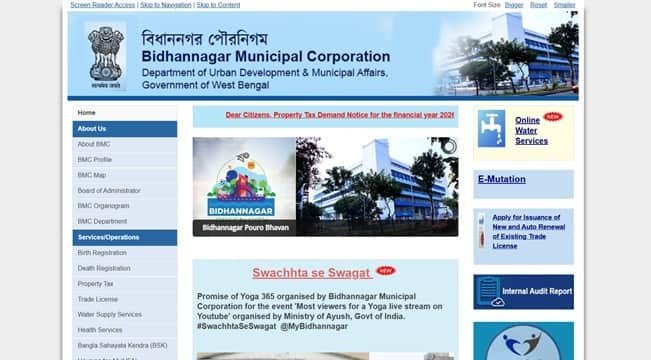
What You Can Do Through BMC Online Services
Bidhannagar Municipal Corporation provides a range of online civic services. For property owners, the most useful current facilities include:
- Online property-tax payment and demand information
- Property-tax demand notice and assessee details
- Assessment, mutation and valuation-related services
- Self-declaration for assessment where applicable
- Complaint and grievance channels
- General permission and other municipal online services
Individual service pages, payment gateways and annual tax notices can change, so the corporation or state/local-government portal should always be treated as the final point of reference.
BMC Property Tax: How the System Works
Property tax in Bidhannagar is administered through the corporation’s Assessment, Mutation and Valuation Department. The assessment record is tied to an assessee and holding, and the demand shown online can include current tax as well as arrears, interest or penalty where applicable.
For 2026-27, BMC has published separate arrangements for different ward groups, with online payment available through its property-tax portal and offline collection through designated centres. Because ward-level arrangements and collection windows can change, property owners should rely on the current demand notice and portal status rather than an old payment schedule.
Key Property Tax Number or Reference
The online property-tax system primarily works with the Assessee Number attached to the property record. A demand notice or older paid receipt is usually the quickest place to find it. The online record also displays holding address, holding number, plot number, ward and property type, which should be checked before payment.
How to Check BMC Property Tax Bill and Dues Online
- Open the official Bidhannagar Municipal Corporation website and go to Property Tax.
- Open the online property-tax payment/search facility.
- Enter the Assessee Number or requested property details.
- Review the owner name, holding address, ward, current demand, arrears and any excess payment shown.
- Confirm that the record belongs to the correct property before proceeding.
How to Pay Bidhannagar Municipal Corporation Property Tax Online
- Retrieve the correct assessee record on the official property-tax portal.
- Select the quarter or demand amount that is currently payable.
- Review current tax, arrears, interest/penalty and the net amount shown.
- Continue to the payment gateway and complete payment using an available online mode.
- Save the challan/transaction reference and confirm that the payment has been posted.
- Download or print the receipt for future property records.
Avoid refreshing or closing the page while a payment is processing. If the bank account is debited but the municipal account does not immediately show success, first verify the transaction or contact official support before attempting a second payment.
How to Download or Verify the Property Tax Receipt
After payment, keep both the online transaction reference and the municipal receipt. BMC notes that some offline or manual transactions may take up to 48 hours to appear online. If a payment does not appear immediately, first recheck the assessee account before attempting a second payment.
BMC Login and Citizen Registration Guide
Direct property-tax payment is designed around the assessee record and does not always require a separate citizen account for a one-time payment. Where registration or another municipal service requires login, use the credentials and verification process shown on the official BMC portal. Do not use third-party login pages for municipal tax payments.
Property Record Correction, Mutation and Ownership Changes
Mutation and valuation are separate from simply paying the tax demand. If ownership has changed, or if the holding address, property type, ward or assessment details are wrong, the owner should use the corporation’s prescribed mutation/assessment route and provide the supporting property documents requested by BMC.
Offline Help and Payment Support
BMC also publishes offline collection arrangements through tax offices and selected bank branches. Carry the demand notice or assessee details when paying or seeking a correction. For unresolved property-tax payment issues, the corporation’s official contact and grievance channels should be used.
Frequently Asked Questions
Q. My offline property-tax payment is not visible online. Should I pay again?
No. BMC states that offline/manual transactions can take time to reflect, and the portal notes a period of up to 48 hours in some cases. Recheck the assessee account first and keep the bank or counter receipt before raising a payment issue.
Q. The online record shows the wrong owner or holding information. Is tax payment enough to correct it?
No. Payment clears the tax demand but does not automatically correct assessment or ownership records. Use the mutation/assessment procedure and submit the documents requested by the corporation.
Q. I have an old demand notice but cannot identify the current property record. What should I use?
Use the Assessee Number and holding details printed on the old notice or receipt. If the portal cannot locate the account, take the old municipal documents to the relevant tax office for mapping and verification.
Q. Can I rely on an old rebate or quarterly amount shown in a previous year?
No. Demand, rebate and collection arrangements can change by financial year. Use the current 2026-27 demand notice and the amount displayed by the official portal.
Q. The property-tax portal is temporarily unavailable for payment. What is the safer option?
Do not move to an unofficial payment page. Recheck the official BMC portal later or use the corporation’s authorised offline collection arrangement and retain the payment receipt.