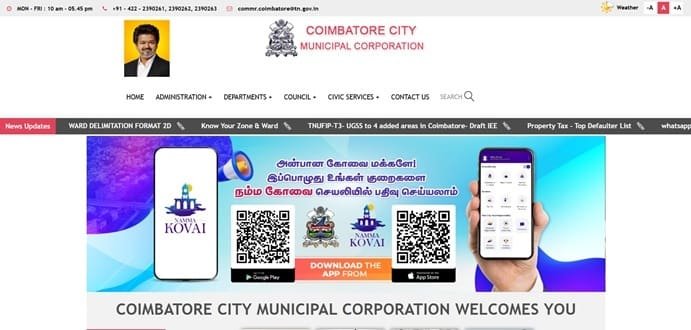
Coimbatore City Municipal Corporation (CCMC) manages municipal services across Coimbatore. Property-tax payment is available online through Tamil Nadu’s urban local-body Citizen Web Portal, while the CCMC website links residents to tax payment, grievances, birth/death certificates and other civic services.
The Tamil Nadu portal uses an Assessment Number, with support for an Old Assessment Number where records have been revised. This is important because ward delimitation has led to changes in some assessment references, and the portal itself asks taxpayers to verify the owner name and assessment number before payment. This guide explains the corporation contact details, assessment search, payment, receipts, login/profile functions and practical steps for disputed or missing records.
Quick About: Coimbatore Municipal Corporation
| Particular | Details |
| Civic body | Coimbatore City Municipal Corporation (CCMC) |
| Main office | Corporation of Coimbatore, Town Hall, Coimbatore – 641001, Tamil Nadu |
| Main phone | 0422-2390261, 2390262, 2390263 |
| commr.coimbatore@tn.gov.in | |
| WhatsApp grievance | 8190000200 |
| Official website | ccmc.gov.in |
| Property-tax portal | Tamil Nadu Urban Citizen Web Portal (tnurbanepay.tn.gov.in) |
| Key property-tax identifier | Assessment Number; Old Assessment Number can also be used where applicable |
| Major online property functions | Property search, view DCB, view assessment/history, make payment, view payment history and citizen grievance/service requests |
Coimbatore Municipal Corporation Head Office Address
CCMC’s main office is at the Corporation Office in the Town Hall area. The corporation also operates zonal offices and municipal collection centres across the city for residents who need offline payment or record support.
Address: Corporation of Coimbatore, Town Hall, Coimbatore – 641001, Tamil Nadu
Phone: 0422-2390261, 2390262, 2390263
Email: commr.coimbatore@tn.gov.in
How Coimbatore Property Tax Is Managed Online
CCMC property-tax payments are handled through the Tamil Nadu urban local-body Citizen Web Portal. The same platform supports several municipal corporations and municipalities, so the taxpayer must select/confirm the correct local body and assessment record before paying.
- Property Search
- View DCB (demand, collection and balance)
- View Assessment
- View Assessment History
- Make Property Tax Payment
- View Payment History
- Manage properties in a citizen profile
- Register grievances and service requests
Assessment Number and Old Assessment Number
The Assessment Number is the principal property-tax reference. The portal also accepts an Old Assessment Number and warns that assessment numbers may have been revised after ward delimitation. Taxpayers should therefore confirm the displayed owner name and property details before making payment.
If an old assessment number maps to a new number, keep both references with your property records because they can be useful when tracing earlier payments.
How to Check Coimbatore Property Tax Details
- Open the CCMC website and choose Online Tax Payment, or open the Tamil Nadu Urban Citizen Web Portal.
- Choose Property Tax and select/confirm Coimbatore City Municipal Corporation.
- Enter the Assessment Number or Old Assessment Number as permitted.
- Retrieve the property record.
- Check owner name, address, zone, ward, usage, tax details and outstanding balance.
How to Pay Coimbatore Property Tax Online
- Open Make Payment and choose Property Tax.
- Select/confirm Coimbatore as the corporation.
- Enter the Assessment Number or Old Assessment Number.
- Review the assessee details, due amount and payable amount.
- Proceed to the authorised payment gateway.
- Complete payment and save the municipal receipt/payment history entry.
Citizen Login: My Properties, My Tax and My Payments
The Tamil Nadu citizen portal provides a profile area where users can add assessments to My Properties, calculate/view tax, make payments, see receipts and manage grievances. This is useful for owners who have more than one property or who need to track multiple municipal services.
The My Payment area includes receipts, while assessment pages provide payment and assessment history.
Offline Collection Centres
CCMC also maintains municipal collection centres, including the main Corporation Office at Town Hall and centres in different zones. If paying offline, use an authorised collection centre and obtain a printed municipal receipt. Do not hand over cash to an unknown intermediary who cannot issue a corporation receipt.
Wrong Assessment or Property Details
If the displayed owner name, property usage, area, ward or assessment is wrong, do not treat the payment page as a correction tool. Use the corporation’s revenue/service-request/grievance channel so the underlying property record can be reviewed. Preserve old assessment numbers, prior receipts and ownership documents because they can help reconcile the record.
If Payment Is Debited but Not Shown in My Receipts
Check My Payment, payment history and the property account before paying again. Keep the bank/UPI transaction reference. If the municipal portal still shows the amount due, raise a grievance with the assessment/payment details and transaction proof.
Frequently Asked Questions
Q. My old tax receipt has a different assessment number from the current portal. Does that mean I have a new property account?
Not necessarily. Tamil Nadu’s portal notes that assessment numbers can be revised after ward delimitation. Use the Old Assessment Number search and confirm the owner/property details before concluding that it is a different account.
Q. The portal shows the correct address but a different owner name. Should I pay first?
If ownership should already have changed, verify the municipal record before relying on the payment screen. Payment will not by itself correct an ownership entry.
Q. I own two properties in Coimbatore. Can both be kept under one online profile?
The citizen portal provides My Properties and Add Assessment functions, allowing multiple assessments to be managed from a registered profile.
Q. My bank account was debited but My Receipts is empty. What should I do?
Check payment history and the assessment account first. Save the bank reference and submit a grievance if the payment is not posted. Avoid a second payment until the first transaction is traced.
Q. Can I pay at a corporation office instead of online?
Yes. CCMC publishes municipal collection centres, including the main office and zonal locations. Obtain the official corporation receipt at the counter.
Q. Why should I check the old assessment number before a property sale?
It helps connect historical payments and older municipal records with the current assessment number, which can be important when verifying dues over several years.