Bhiwandi Nizampur City Municipal Corporation (BNCMC) manages civic services in Bhiwandi and Nizampur and operates a dedicated property-tax portal for taxpayers. The system is practical because a citizen can search using a property number, old property number or owner name, see the tax details and make payment without first creating a traditional username-and-password account.
The portal also publishes a dedicated property-tax helpdesk, payment instructions and FAQ support. This is useful in a city where older property references can still appear in documents and where taxpayers may need to reconcile an old number with a current property record. The guide below covers the current office details, search and payment flow, receipt precautions and the problems that should be taken to BNCMC rather than solved by repeated online payments.
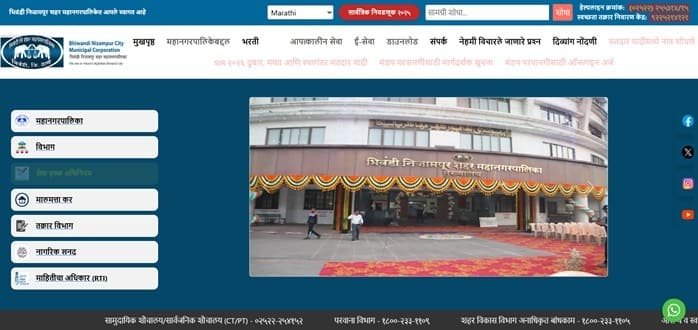
Quick About Bhiwandi Nizampur City Municipal Corporation
| Particular | Details |
| Civic body | Bhiwandi Nizampur City Municipal Corporation (BNCMC) |
| Head office | BNCMC New Administrative Building, Anand Dighe Chowk, Opp. Rajiv Gandhi Flyover, Near Kaap Alley, Bhiwandi, Maharashtra – 421302 |
| Main phone | 02522-255314 / 255315 |
| Property-tax helpdesk | 8657530360 |
| Helpdesk email | bncmchelpdesk@ascentechindia.com |
| Official website | bncmc.gov.in |
| Property-tax portal | propertytax.bhiwandicorporation.in |
| Search options | Property Number, Old Property Number and Owner Name |
| Online payment modes listed by portal | Net banking, debit/credit card and UPI |
BNCMC Head Office Address and Contact Details
BNCMC’s new administrative building is located near the Rajiv Gandhi Flyover. The corporation’s general office contact is separate from the dedicated online property-tax helpdesk, so use the helpdesk for portal/payment problems and the municipal office for record or administrative matters.
Address: BNCMC New Administrative Building, Anand Dighe Chowk, Opp. Rajiv Gandhi Flyover, Near Kaap Alley, Bhiwandi, Maharashtra – 421302
Phone: 02522-255314 / 255315
Property-tax Helpdesk: 8657530360
Property-tax Email: bncmchelpdesk@ascentechindia.com
Official website: bncmc.gov.in
How to Search a BNCMC Property Tax Record
The BNCMC portal supports more than one search method, which is useful when a taxpayer has an older bill or incomplete property details.
- Current Property Number
- Old Property Number
- Owner Name
- Additional property/sub-code or prabhag information where requested by the search screen
Use the most precise identifier available. Searching only by owner name can return multiple records, so always verify the address and property details before payment.
How to Check Bhiwandi Property Tax Bill Online
- Open the BNCMC property-tax portal.
- Choose the Property Tax section.
- Select the appropriate search method and enter the property details.
- Click Search and open the correct property record.
- Review the property information and bill amount before choosing Pay Now.
How to Pay BNCMC Property Tax Online
BNCMC’s portal states that online property-tax payment can be made through net banking, debit card, credit card or UPI. A mobile number and email ID are mandatory during payment.
- Search and open the correct property.
- Confirm the outstanding bill amount.
- Click Pay Now.
- Enter the required mobile number and email ID.
- Choose an available payment method and complete the transaction.
- Save the confirmation and municipal receipt.
BNCMC Login Guide: Is an Account Required
A standard citizen username/password login is not required simply to search and pay a property-tax bill on the public portal. The property search itself acts as the starting point. This is different from internal municipal systems or other service modules, so taxpayers should use the public property-tax page.
Old Property Number and Current Property Number
Older bills may carry a previous property number. BNCMC provides an Old Property No. search specifically for such cases. If the old number returns a current record, note the newer property reference for future payments. If it does not match, contact the helpdesk rather than trying random property numbers.
When Online Property Details Do Not Appear
BNCMC’s own FAQ directs taxpayers to its property-tax helpline or helpdesk email when property details cannot be viewed during online payment. When reporting the issue, provide the property number/old number, owner name, address and a copy or image of the last bill if available.
Property Tax Due Dates and Arrears
The BNCMC portal notes that property tax is payable in half-yearly instalments in advance under the applicable municipal rules, with dates linked to the financial-year cycle. A bill may also contain administrative charges, warrant or recovery costs where applicable.
Rather than calculating arrears independently, rely on the live bill displayed by BNCMC because recovery costs and prior adjustments can change the final payable amount.
If Payment Is Debited but the Bill Still Shows Unpaid
Do not pay again immediately. Keep the bank transaction ID, date, amount, property number, mobile number and email used in the transaction. Check whether a receipt becomes available and then contact the BNCMC helpdesk if the payment is still not reflected.
Frequently Asked Questions
Q. I only have an old BNCMC property number. Can I still locate the current tax bill?
Yes. The property-tax portal has a separate Old Property No. search. Use it to retrieve the current record and note the current property reference if one is displayed.
Q. The owner-name search gives several properties. How do I avoid paying the wrong bill?
Match the address, property number, sub-code and other displayed details with your previous bill. Do not proceed based on owner name alone.
Q. Why does BNCMC ask for both a mobile number and email during online payment?
The portal requires both contact details as part of the online payment process. Use working details because they can help with transaction communication and support if the receipt is delayed.
Q. My bank was debited, but the BNCMC property still appears unpaid. Should I click Pay Now again?
No. First preserve the transaction reference and check for a generated receipt. If the status does not update, contact the dedicated BNCMC property-tax helpdesk before making another payment.
Q. The online portal cannot find my property even though I have an old paper bill. What should I send to the helpdesk?
Provide the old property number, owner name, full address and a copy or clear image of the earlier bill. This gives the helpdesk enough information to trace the record without guessing.