Gandhinagar Municipal Corporation (GMC) manages civic administration across the Gujarat capital and its expanded municipal areas. For property owners, one of the most important GMC functions is property-tax assessment and collection, because the municipal record is used not only for annual tax payment but also for name changes, correction of property details and new assessments.
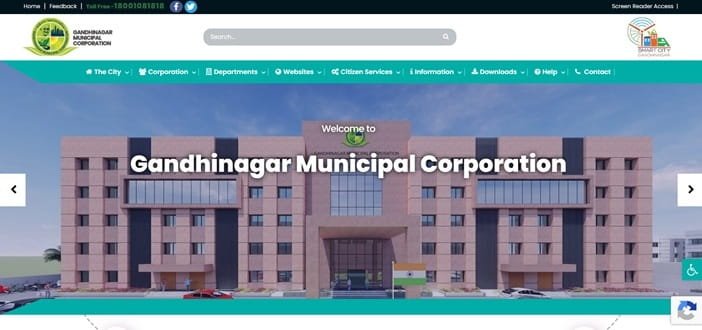
GMC now provides a dedicated online property-tax system where citizens can search a tenement, check dues, make payment and download a receipt. The corporation also publishes property-tax forms and guidance for ownership changes, factor corrections and assessment work. This guide brings together the head-office details, current property-tax process, bill payment, online access, receipts and the practical steps to follow when the municipal record needs correction.
Quick About Gandhinagar Municipal Corporation
| Particular | Details |
| Civic body | Gandhinagar Municipal Corporation (GMC) |
| Main office | Pandit Dindayal Upadhyay Bhavan, Behind Fire Station, Sector 17, Gandhinagar – 382016 |
| Main phone | 079-23284150 |
| Toll-free number | 1800-108-1818 |
| gmc8gandhinagar@gmail.com | |
| Official website | gandhinagarmunicipal.com |
| Key property-tax identifier | Tenement number; the online portal shows a format similar to 1001C104098 |
| Major property services | Online tax payment, dues search, receipt download, property-tax application, name-change fee payment, assessment/correction forms |
Gandhinagar Municipal Corporation Head Office Address
The GMC head office is located in Sector 17 and is the main administrative point for municipal matters that cannot be resolved through an online service or a nearby civic centre. Property owners dealing with assessment corrections, ownership records or documentary verification may also be directed to the appropriate zonal or tax office.
Address: Pandit Dindayal Upadhyay Bhavan, Behind Fire Station, Sector 17, Gandhinagar – 382016
Phone: 079-23284150
Toll-free: 1800-108-1818
Email: gmc8gandhinagar@gmail.com
Official website: gandhinagarmunicipal.com
What You Can Do Through GMC Property Tax Services
The property-tax section is not limited to making a yearly payment. GMC provides separate facilities for payment, property-tax applications and name-change fees, while its online module also supports dues checking and receipt-related work.
- Pay property tax online
- Search a tenement and check dues
- Download a property-tax receipt after successful payment
- Apply for property-tax assessment
- Pay name-change fees
- Use forms for name/occupier change, assessment correction and factor change
- Approach the nearest civic centre when documentary verification or survey is required
How Gandhinagar Property Tax Is Assessed
GMC uses an area- and factor-based system rather than one flat rate for every property. The corporation publishes separate factors connected with the location or land-value category, age of the property, occupancy and the type or use of the property. Residential and non-residential properties are therefore not necessarily assessed in the same way.
This matters when a bill looks unexpectedly high or low. An incorrect age, occupancy status, property type, carpet area or use can affect the assessment. Owners should compare the bill with the actual property and seek a formal correction where the municipal record is wrong instead of assuming that the tax amount can be changed manually at the payment stage.
Where to Find the GMC Tenement Number
The tenement number is the main property reference used by the GMC online tax system. The payment portal shows a sample format such as 1001C104098. The number can normally be found on an earlier property-tax bill or receipt.
Before paying, check that the owner or occupier name, address and property description shown against the tenement correspond to the correct premises. This is especially important where a society contains several flats or where a property has undergone a sale, partition or change in use.
How to Check Gandhinagar Property Tax Dues Online
- Open the official Gandhinagar Municipal Corporation website.
- Go to the Property Tax section and open the online payment or dues-search service.
- Enter the tenement number exactly as printed on the municipal record.
- Search for the property and verify the displayed address and tax details.
- Review current dues and arrears before proceeding to payment.
How to Pay Gandhinagar Property Tax Online
GMC directs citizens from its Property Tax page to the online payment module. The available payment choices are displayed by the gateway during the transaction, so the current checkout page should be treated as the final reference.
- Search the property using the tenement number.
- Confirm that the correct property and outstanding amount are displayed.
- Proceed to the payment page.
- Enter the contact details requested by the portal and select an available payment mode.
- Complete the transaction without repeatedly refreshing or reopening the payment page.
- After confirmation, save the order/reference number and download the municipal receipt.
If an earlier attempt did not complete, GMC specifically advises users to check whether the bank account or card has already been debited before trying again. The portal asks users to wait at least 30 minutes before retrying an unsuccessful payment.
How to Download GMC Property Tax Receipt
A municipal receipt is the safest proof that the payment has been posted against the correct tenement. GMC provides a receipt-download facility after successful payment, and the payment status page can show details such as the order ID, payment amount, gateway, payment mode and receipt number.
- Open the GMC property-tax service.
- Use the receipt or paid-details option available in the property-tax module.
- Enter the relevant tenement or transaction details.
- Open the successful payment record.
- Download and keep the receipt with your property documents.
GMC Login, Online Applications and Property Changes
Routine tax lookup is based mainly on the tenement number, so a separate citizen login is not always necessary just to view or pay a tax bill. Applications for assessment or other property-related changes, however, may require mobile/contact details and supporting documents through the online application or civic-centre process.
For ownership change or correction, GMC lists documents such as the deed copy, index copy, identity proof and, depending on the case, building permission, plan or other supporting records. A property surveyor may be sent for verification where an assessment, name or factor needs to be changed.
If the Property Record Is Wrong
Do not try to solve a wrong assessment simply by paying the amount and assuming the record will update automatically. GMC provides separate forms for taxpayer/occupier name change, factor change, extra-bill cancellation and assessment work.
- For a sale or ownership change, keep the registered deed and index copy ready.
- For area or building-detail correction, keep the sanctioned plan/building permission where applicable.
- For spelling or identity correction, use appropriate identity/address proof.
- For an occupier or tenant change, follow the prescribed written application and verification process.
Frequently Asked Questions
Q. My bank account was debited but the GMC receipt was not generated. Should I pay again?
No. First check whether the earlier transaction has been debited and allow the portal time to update. GMC advises against immediate duplicate payment. Keep the order or SBI ePay reference number available if the receipt still does not appear and support is required.
Q. The property was purchased recently, but the old owner still appears on the tax record. Does paying the tax transfer the name?
No. Tax payment and name transfer are separate processes. Use the GMC name-change procedure and submit the ownership documents required for municipal verification.
Q. The age or occupancy factor on my property appears wrong. Can the tax counter change it while I pay?
A wrong factor should be corrected through the prescribed property-tax correction process. GMC publishes a Factors Change Form and may verify the property before revising the assessment.
Q. My tenement number returns a property, but the address does not match mine. What should I do?
Do not make payment against a mismatched record. Take the earlier bill, deed or other property documents to the relevant GMC tax/civic office and have the property reference verified.
Q. Can a new or previously unassessed property be added to the GMC tax system online?
GMC provides an application route for property-tax assessment. The applicant should be ready with ownership and building-related documents, and physical verification may be required before the assessment is finalised.