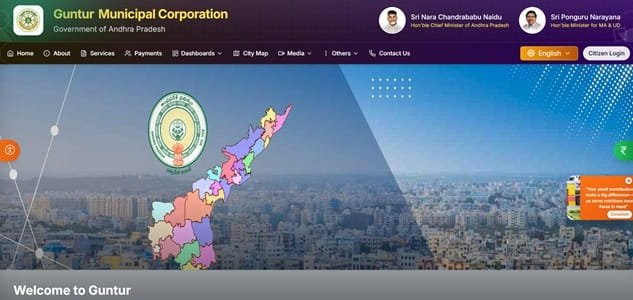
Guntur Municipal Corporation (GMC) is part of Andhra Pradesh’s Commissioner & Director of Municipal Administration digital system. Property owners in Guntur can use the official CDMA portal not only to pay property tax but also to check dues, file self-assessment, request mutation, report additions or alterations, apply for vacancy remission, submit revision petitions and track applications.
That wider service range makes it important to distinguish a simple payment from a change in the property record. Paying a demand does not automatically update ownership, building additions or assessment particulars. This guide covers the main GMC address and contacts, property-tax payment route, assessment references, receipts, self-assessment and the correction/application services that property owners may need.
Quick About Guntur Municipal Corporation
| Particular | Details |
| Civic body | Guntur Municipal Corporation |
| Main office | Guntur Municipal Corporation, Opposite Gandhi Park, Guntur, Andhra Pradesh – 522003 |
| Main phone | 9849908363 |
| Citizen/property-tax support | Use CDMA/GMC online grievance and municipal contact channels |
| commissioner@gunturcorporation.org | |
| Official website | guntur.cdma.ap.gov.in |
| Key property-tax identifier | Assessment Number / Door Number |
| Major online property-tax services | Know Your Property Tax Dues, File Self Assessment, Addition/Alteration and Demolition applications, Tax Exemption and Vacancy Remission applications, Revision and General Revision Petitions |
Guntur Municipal Corporation Head Office Address
The main municipal office is located at Guntur Municipal Corporation, Opposite Gandhi Park, Guntur, Andhra Pradesh – 522003. Citizens who need document verification, property-record correction or assistance beyond routine online payment can approach the corporation or the relevant zonal/ward office.
- Address: Guntur Municipal Corporation, Opposite Gandhi Park, Guntur, Andhra Pradesh – 522003
- Phone: 9849908363
- Email: commissioner@gunturcorporation.org
- Support: Use CDMA/GMC online grievance and municipal contact channels
What You Can Do Through GMC Online Services
Guntur Municipal Corporation provides a range of online civic services. For property owners, the most useful current facilities include:
- Know Your Property Tax Dues
- File Self Assessment
- Addition/Alteration and Demolition applications
- Tax Exemption and Vacancy Remission applications
- Revision and General Revision Petitions
- Property Mutation
- Download Proceedings and check application status
- Online property-tax payment with receipt generation
Individual service pages, payment gateways and annual tax notices can change, so the corporation or state/local-government portal should always be treated as the final point of reference.
GMC Property Tax: How the System Works
Andhra Pradesh municipal property-tax records use property assessment information that can include the Assessment Number, Door Number, owner, locality, zone, ward, construction type, usage and plinth area. These details are important because the tax demand is tied to the municipal assessment rather than merely to a postal address.
The Guntur CDMA service menu separates payment from assessment-related applications. If a building has changed substantially, ownership has changed or the recorded assessment is disputed, use the appropriate self-assessment, addition/alteration, mutation or revision service rather than treating online payment as a correction.
Key Property Tax Number or Reference
For an existing building, the Assessment Number and Door Number are the key references used in Andhra Pradesh property-tax records. They are typically available on older municipal tax documents. Keep both when possible because they help distinguish properties with similar owner names or addresses.
How to Check GMC Property Tax Bill and Dues Online
- Open the official Guntur CDMA portal.
- Go to Online Services and select Property Tax – Know Your Dues.
- Enter the property/assessment details requested by the system.
- Verify the owner, door/property information and outstanding demand.
- Use the relevant application service if the assessment needs correction.
How to Pay Guntur Municipal Corporation Property Tax Online
- Open Online Payments on the Guntur CDMA portal.
- Choose Property Tax.
- Enter the property/assessment details and retrieve the demand.
- Review the amount and property record.
- Pay through an available method such as card, net banking, UPI or wallet.
- Download the receipt after successful payment.
Avoid refreshing or closing the page while a payment is processing. If the bank account is debited but the municipal account does not immediately show success, first verify the transaction or contact official support before attempting a second payment.
How to Download or Verify the Property Tax Receipt
The CDMA payment page states that property-tax payments provide confirmation and receipt generation. Save the receipt and application/proceeding numbers separately, because a tax payment receipt and an assessment/mutation proceeding serve different purposes.
GMC Login and Citizen Registration Guide
Some direct payment functions can be reached from the payment section, while applications such as self-assessment or mutation may require citizen details and verification. Follow the login/application instructions presented by the CDMA portal for the specific service rather than assuming one login flow applies to every function.
Property Record Correction, Mutation and Ownership Changes
GMC provides dedicated services for mutation, addition/alteration, demolition, tax exemption, vacancy remission and revision petitions. Choose the service that matches the actual change. For example, a new owner should use mutation, while a change in the physical building may require an addition/alteration application.
Offline Help and Payment Support
For a property record that cannot be resolved online, citizens can approach GMC opposite Gandhi Park with the assessment details and supporting documents. Keep the old tax receipt, assessment number/door number and ownership documents together when asking for record-level changes.
Frequently Asked Questions
Q. I added another floor to my building. Is paying the old property-tax demand enough?
No. GMC provides a specific Addition/Alteration service. A physical change to the building should be brought into the municipal assessment instead of continuing indefinitely on the old record.
Q. The property is vacant. Can I simply stop paying tax?
No. GMC provides a formal Vacancy Remission service. Any relief should be claimed through that process and supported as required; vacancy should not be treated as an automatic cancellation of tax.
Q. I disagree with the assessed amount. Is there an online route besides paying first?
The Guntur property-tax service menu includes Revision Petition and General Revision Petition options. Use the appropriate prescribed route for an assessment dispute.
Q. I bought the property but the assessment still shows the seller. Which service applies?
Use the Property Mutation service and provide the required ownership documents. A receipt showing tax paid by you does not itself change the owner in the municipal assessment.
Q. What is the difference between Assessment Number and Door Number?
The Door Number identifies the building/location, while the Assessment Number is the municipal tax-assessment reference. Keep both because the corporation may ask for either depending on the service.