Surat Municipal Corporation (SMC) is the civic authority responsible for municipal administration and day-to-day urban services across Surat. For property owners, businesses and residents, its Virtual Civic Center is particularly useful because routine work such as checking property-tax dues, viewing bills, paying tax, reprinting receipts, applying for name transfer and submitting assessment-related applications can be handled online.
SMC operates both a direct e-payment service and a profile-based citizen portal. A citizen can pay against a property using the tenement details, while a registered profile is more convenient for people managing several properties or municipal services because enrolled property-tax, professional-tax and water-meter records can remain linked to the same account. This guide covers the main office details, property-tax search and payment process, login, receipts, assessment services and practical support options.
Quick About: Surat Municipal Corporation
| Particular | Details |
| Civic body | Surat Municipal Corporation (SMC) |
| Main office | Shri Tapi Bhawan – Surat Mahanagar Seva Sadan, Gordhandas Chokhawala Marg, Shri Tapipura, Surat – 395003 |
| Main contact | +91-261-2423750 to 2423756; +91-261-2422285 to 2422287 |
| Property-tax support | epay@suratmunicipal.org for e-payment transaction queries |
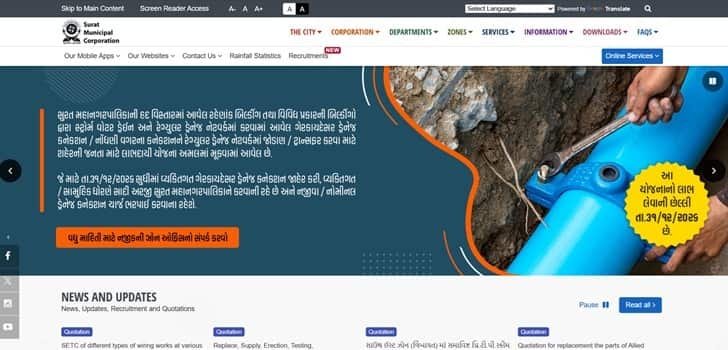
| Official website | suratmunicipal.gov.in |
| Key property-tax identifier | Tenement number shown on the SMC property-tax record/bill |
| Major online property-tax services | Check and pay tax, view bill, transaction status, reprint receipt, name transfer, new/self assessment, reassessment and senior-citizen rebate application |
Surat Municipal Corporation Head Office Address
SMC’s main administrative office is housed at Shri Tapi Bhawan, Surat Mahanagar Seva Sadan. Citizens who need help beyond routine online transactions can approach the relevant zone office or civic centre, especially for assessment corrections, ownership issues or records that cannot be resolved through the portal.
Address: Shri Tapi Bhawan – Surat Mahanagar Seva Sadan, Gordhandas Chokhawala Marg, Shri Tapipura, Surat – 395003
Phone: +91-261-2423750 to 2423756; +91-261-2422285 to 2422287
What You Can Do Through SMC Online Services
SMC’s Virtual Civic Center brings a wide range of municipal services into one online system. For property owners, the most useful functions go beyond simple payment and include account management and assessment-related work.
- Check outstanding property tax and make payment
- View the current property-tax bill
- Check transaction status and reprint a receipt
- Apply for property-tax name transfer
- Submit new/self-assessment and reassessment applications
- Apply for senior-citizen tax rebate where eligible
- Manage professional-tax and water-meter services
- Track transactions through a registered citizen profile
How SMC Property Tax Records Work
SMC identifies a property through its tenement number. The number appears on the municipal tax record and is required when searching a property online. The portal displays the property and pending amount before payment, so the owner should confirm the premises and assessment details rather than paying only on the basis of an amount received through a message or third-party reminder.
Property-tax rebates or concessions can depend on SMC policy and may change from one period to another. A current bill or official portal notice should therefore be treated as the final source for any rebate shown at the time of payment.
How to Check Surat Property Tax Bill and Dues Online
- Open the official SMC website and enter the Virtual Civic Center or Property Tax section.
- Choose the option to check/pay Property Tax or view the bill.
- Enter the tenement number exactly as shown on the tax record.
- Complete the verification/captcha shown on the page.
- Retrieve the property and review the pending amount, property description and other details.
- Proceed to payment only after confirming that the retrieved property is correct.
How to Pay Surat Property Tax Online
SMC supports online property-tax payment through its official payment system. The payment gateway can offer several digital modes, and the available choices should be taken from the live gateway rather than an old list.
- Retrieve the property using the tenement number.
- Check the outstanding amount and select the payment option.
- Continue to the official payment gateway.
- Choose an available digital payment method and complete authentication.
- Wait for SMC to return a successful transaction response.
- Save the transaction number and download or print the receipt.
SMC Login and Citizen Profile
The profile-based Virtual Civic Center is useful when a citizen wants to manage multiple services in one place. Registration uses a mobile number and email address, followed by verification. Once logged in, users can enrol property-tax, professional-tax and water-meter records and then view transactions against the linked services.
- Open the profile-based Virtual Civic Center.
- Choose Create Account if you are a new user.
- Register with your mobile number and email address and complete verification.
- Log in using the registered credentials.
- Search and enrol the relevant property or other municipal service.
- Use My Registrations and My Transactions to manage future activity.
How to Download or Reprint an SMC Property Tax Receipt
A successful SMC payment should generate an online receipt. If you need another copy later, use Check Transaction Status & Reprint Receipt. The transaction can be traced using the information requested by the portal, which may include the tenement number, transaction ID, reference number or registered email details.
Keep the receipt as part of the property record. It is useful during resale, name transfer, loan verification and any later dispute over whether a particular tax period was paid.
Name Transfer, Reassessment and Record Correction
SMC provides separate online facilities for name transfer, new/self assessment and reassessment. A name transfer should be completed after a property changes hands; simply paying tax against the old record does not by itself establish that the municipal ownership entry has been updated.
If property information displayed online contains an error, SMC directs citizens to the Assessment & Recovery Department of the relevant zone. Keep the tax bill, ownership papers and supporting records ready so the department can verify the correction requested.
If Money Is Debited but No Receipt Is Generated
Do not immediately make a second payment. First use SMC’s transaction-status page. A payment is treated as successful when the payment response reaches SMC and a receipt is generated. If the transaction remains failed, the banking channel normally handles reversal according to its process. For an unresolved transaction, write to the SMC e-payment support address with the tenement number, transaction ID/reference number, date and amount.
Frequently Asked Questions
Q. My bank account was debited but SMC did not generate a property-tax receipt. Should I pay again?
First check the official transaction-status page using the available transaction details. Do not duplicate the payment merely because the receipt did not appear immediately. If the transaction cannot be traced, raise an e-payment query with SMC and include the tenement number, date, amount and reference details.
Q. The property details shown online are wrong. Can the e-payment section correct them?
No. The e-payment service uses assessment data supplied by the relevant zone. Errors in property description, assessment or related records should be taken up with the Assessment & Recovery Department of the concerned SMC zone.
Q. I bought a resale property but the old owner’s name still appears. Is the tax payment enough?
No. Payment clears tax liability but does not replace the name-transfer procedure. Use SMC’s property-tax name-transfer service and submit the ownership documents requested for the case.
Q. Can I manage more than one Surat property from one citizen account?
Yes. The profile-based Virtual Civic Center is designed so a registered user can enrol multiple municipal service records, including properties, and review transactions from one profile.
Q. Can a senior-citizen benefit be claimed automatically during online payment?
Only if the property/account satisfies SMC’s current eligibility and registration requirements. Do not assume a discount from an old bill or old online article; verify the current SMC policy and the status of the property before payment.
Q. The website shows a different outstanding figure from my old paper bill. Which amount should I pay?
Check whether later dues, adjustments or assessment changes have been posted. If the difference is not understandable, confirm it with the relevant Assessment & Recovery office before making a large or disputed payment.