Kalyan Dombivli Municipal Corporation (KDMC) administers civic services across the Kalyan-Dombivli municipal area in Thane district. Property tax and water charges are among the most frequently used citizen services, and KDMC provides web/mobile access so residents can check municipal bills and make payments without depending only on a ward-office visit.
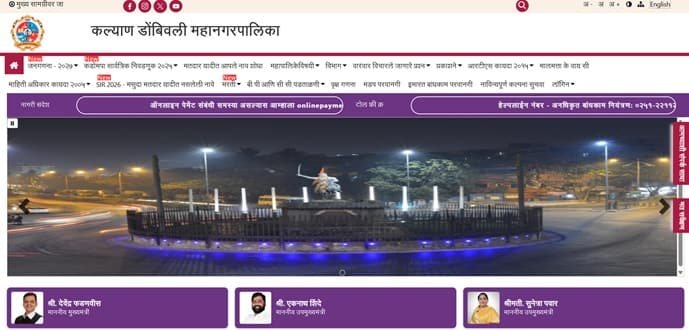
KDMC’s digital services have changed over time and may be presented through the corporation website, its citizen/mobile platform or an integrated service page. For that reason, property owners should rely on the current KDMC screen and the property/assessment reference printed on their bill rather than following screenshots from old guides. This article covers the headquarters, property-tax payment, receipt checks, login basics, ownership-record issues and practical safeguards.
Quick About: Kalyan Dombivli Municipal Corporation
| Particular | Details |
| Civic body | Kalyan Dombivli Municipal Corporation (KDMC) |
| Head office | KDMC Head Office, Shankarrao Chowk / Shivaji Chowk, Kalyan West, Thane, Maharashtra – 421301 |
| Property-tax department contacts | 0251-2211313 / 0251-2203621 (departmental numbers commonly published for property-tax support) |
| Official website | kdmc.gov.in |
| Mobile citizen service | KDMC 24 x 7 app |
| Key property-tax identifier | Property/assessment reference shown on the KDMC tax bill |
| Major online functions | Property-tax details/payment, water-bill services, citizen service access and digital transaction/receipt functions available on the current KDMC platform |
Kalyan Dombivli Municipal Corporation Head Office
The KDMC administrative headquarters is in Kalyan West near Shivaji Chowk/Shankarrao Chowk. Property owners can use the online system for routine payments, while disputed assessments, ownership corrections or records that cannot be found online may require contact with the property-tax department or the appropriate ward office.
Address: KDMC Head Office, Shankarrao Chowk / Shivaji Chowk, Kalyan West, Thane, Maharashtra – 421301
KDMC Property Tax and Citizen Services
KDMC provides digital access to key municipal services, including property tax and water billing. The KDMC 24 x 7 mobile application is also intended to give citizens access to municipal bill information and services from a phone.
- Check property-tax details and outstanding demand
- Make property-tax payment through the current official channel
- Access water-bill information and payment
- Use digital citizen-service functions from the KDMC website/app
- Keep payment acknowledgement/receipt for future property records
How to Identify the Correct KDMC Property Record
Use the property or assessment reference shown on your latest KDMC bill or municipal record. The exact field name and login screen can change as KDMC updates its e-governance platform, so copy the identifier exactly from the bill instead of relying on an old screenshot or a neighbour’s format.
Before payment, match the owner/occupier name, property address and bill period. This is especially important in housing societies, redeveloped buildings and properties where ownership has changed.
How to Check and Pay KDMC Property Tax Online
- Open kdmc.gov.in and use the current property-tax/citizen-services link, or open the official KDMC 24 x 7 service where applicable.
- Enter the property/assessment information requested on the live screen.
- Retrieve the bill and verify the property and outstanding amount.
- Choose the official online payment option.
- Complete payment through the available gateway.
- Save the transaction reference and download/retain the municipal receipt.
KDMC Login and Mobile Access
KDMC’s citizen interfaces may require mobile/account verification or a registered login for some functions. Follow the current registration/login prompts shown by KDMC. Do not enter credentials into an unofficial copy of the payment page, and check that the site or app identifies Kalyan Dombivli Municipal Corporation before submitting financial details.
The mobile app can be convenient for repeat users, but important ownership or assessment changes should still be verified against the municipal property record rather than assumed from a successful bill payment.
How to Keep a Valid KDMC Property Tax Receipt
After payment, save the receipt or transaction acknowledgement generated by the official system. A bank debit or UPI success screen is useful evidence, but the KDMC receipt is the stronger municipal proof that the tax has been credited to the correct property account.
For resale or loan documentation, keep receipts from multiple years where possible, not only the latest bank message.
Ownership Change and Assessment Corrections
A tax payment does not automatically correct the municipal ownership record. If a property has been purchased, inherited or otherwise transferred, complete the applicable KDMC name/ownership-update process with the property-tax department. Likewise, an incorrect area, usage or property description should be challenged through the assessment/revenue channel rather than “corrected” by paying a manually calculated amount.
Keep the registered ownership document, earlier bill, latest receipt and any society/property supporting records ready when approaching KDMC.
If the Payment Is Debited but KDMC Does Not Show Success
Do not immediately pay again. Save the payment reference and wait for the municipal transaction status to update. Recheck the property account and receipt history. If the payment remains unposted, contact the property-tax support/ward office with the property reference, amount, date and bank transaction details.
Frequently Asked Questions
Q. The KDMC website/app interface looks different from an older guide. Which steps should I follow?
Use the current official KDMC page or KDMC 24 x 7 interface. Municipal portals are periodically redesigned, so the live field names and navigation are more reliable than old screenshots.
Q. I paid tax for a resale flat, but the municipal bill is still in the previous owner’s name. Is the transfer complete?
No. Clearing tax and changing the municipal ownership record are separate actions. Approach KDMC for the applicable ownership/name-transfer process with the registered property documents.
Q. My bank shows a successful payment but KDMC has no receipt. Can the bank message be treated as final tax proof?
The bank message proves that a debit occurred, but you should still obtain or confirm the KDMC municipal receipt. If the payment is not credited, raise the issue with the transaction reference instead of paying twice.
Q. The property area or usage shown on the KDMC bill appears wrong. Should I calculate a lower amount myself?
No. Ask the property-tax/revenue department to correct or reassess the municipal record. Paying a self-calculated figure does not amend the official assessment.
Q. I cannot find my property online even though I have an old KDMC bill. What is the safest next step?
Take the old bill and ownership documents to the relevant KDMC property-tax/ward office or use official support so the correct current property reference can be mapped.
Q. Can I use a third-party bill-payment app if it lists KDMC?
Only if you are satisfied that the biller is officially integrated and the property details match exactly. For disputed, high-value or ownership-sensitive payments, the KDMC portal/app provides a clearer municipal transaction trail.