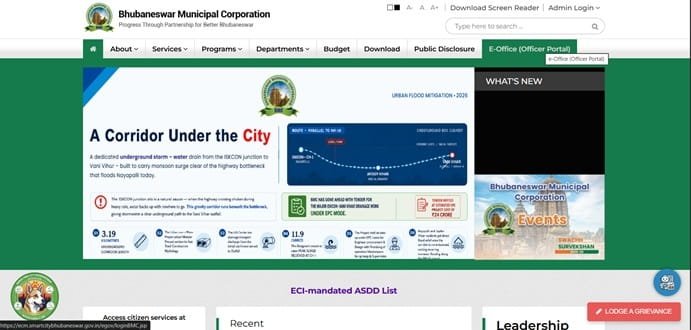
Bhubaneswar Municipal Corporation (BMC) is the civic body responsible for municipal services in Odisha’s capital, including sanitation, roads, public health, licensing and the assessment and collection of property or holding tax. For a property owner, the holding-tax record is particularly important because it connects the property with its tax ward, holding number, payment history and future assessment or correction applications.
BMC’s digital system is more detailed than a simple payment page. Through the Bhubaneswar citizen-services platform, a user can view or pay holding tax, search for a ward and holding number, apply for assessment, track applications, view demand notices and check payment history. This guide explains how those services work, where to contact BMC and what to do when a holding number, mobile number or assessment record needs attention.
Quick About Bhubaneswar Municipal Corporation
| Particular | Details |
| Civic body | Bhubaneswar Municipal Corporation (BMC) |
| Head office | ICOMC Tower, Unit-IX, in front of Satya Nagar Kali Temple on Janpath, Bhubaneswar, Odisha – 751022 |
| Main contact | 8280282000 |
| Citizen helpline | 1929 (Bhubaneswar One, toll-free) |
| info@bmc.gov.in / grievance@bmc.gov.in | |
| Official website | bmc.gov.in |
| Property-tax portal | Bhubaneswar.me Property & Holding Tax service |
| Key property identifiers | Tax Ward Number and Holding Number |
| Major online services | View/pay holding tax, assessment application, demand notices, payment history, application tracking and holding search |
Bhubaneswar Municipal Corporation Head Office Address
BMC operates from the ICOMC Tower in Unit-IX and also maintains zonal offices for South West, North and South East areas. The head office and the 1929 helpline are useful where an online holding-tax issue cannot be resolved through the portal.
Address: ICOMC Tower, Unit-IX, in front of Satya Nagar Kali Temple on Janpath, Bhubaneswar – 751022
Phone: 8280282000
Helpline: 1929
Email: info@bmc.gov.in / grievance@bmc.gov.in
Official website: bmc.gov.in
What You Can Do Through BMC Property and Holding Tax Services
Bhubaneswar’s dedicated holding-tax service brings payment and assessment functions into one portal. The most useful facilities for owners are:
- View and pay holding tax
- Search by ward and holding number
- Find a ward and holding number using the owner name search
- Apply for a new holding assessment
- Track an assessment or correction application
- Upload plan documents where required
- View payment details and payment history
- View municipal demand notices
How BMC Holding Tax Works
The BMC Revenue/Tax Department is responsible for assessment and collection of holding tax within the corporation area. A computerised database of holding-tax assessment records is maintained for properties under BMC.
For payment purposes, the property is identified by its tax ward and holding number. A legacy holding number may also appear in older records. Property details such as plot number, owner name and assessment history are used when searching or processing an application, which is why an owner should correct a wrong record rather than simply continuing to pay against inaccurate details.
How to Find the Ward and Holding Number
If you already have a previous BMC tax bill or receipt, use the Tax Ward Number and Holding Number printed on it. If the number is not known, the Bhubaneswar holding-tax portal provides a search facility using the owner’s name.
- Open the Property & Holding Tax service on the Bhubaneswar citizen-services portal.
- Choose the option to know the ward and holding number by name.
- Enter the owner’s first and last name as accurately as possible.
- Review the matching records and identify the correct property.
- Note the tax ward and holding number for future payments.
How to Check Bhubaneswar Holding Tax Dues Online
- Open the Property & Holding Tax portal.
- Choose View/Pay Holding Tax.
- Select the correct Ward Number.
- Enter the Holding Number.
- Open the property details and review the outstanding demand, owner details and payment information before paying.
How to Pay Bhubaneswar Property or Holding Tax Online
The payment page asks the user to select the amount to pay and provide a mobile number and email address before proceeding. Always verify the holding details before moving to the gateway.
- Retrieve the property using the ward and holding number.
- Check the outstanding demand and select the amount permitted by the portal.
- Enter the required mobile number and email ID.
- Proceed to the official payment gateway and choose an available payment mode.
- Complete the transaction and save the payment reference.
- Return to the payment history/receipt area to confirm that the tax has been posted.
Bhubaneswar Login and Assessment Application Guide
The broader Bhubaneswar citizen-services portal supports account sign-in for city services, while the holding-tax assessment process uses mobile-number verification. To start a new holding assessment, the portal asks the applicant to verify a mobile number using OTP.
- Open Apply for Assessment under Property & Holding Tax.
- Enter the mobile number and request the OTP.
- Verify the OTP to start or access the assessment application.
- Fill in the property and ownership details requested by the system.
- Upload supporting plan or property documents where required.
- Save the application number and use My Applications to track progress.
What If the Mobile Number Is Not Linked to the Holding
The holding-tax search system can display a message that no mobile number is available for a particular holding. In that case, BMC directs the citizen to contact the ward officer to register or update the mobile number. This is important because OTP verification may be required for certain services and applications.
New Holding, Correction and Assessment Issues
A property that has not yet received a holding number should not be forced into an unrelated existing record. Use the assessment application process or contact BMC/ward officials. The portal also keeps application history for correction and new-assessment cases.
Keep ownership papers, plot and khata details, approved plan information and previous tax records available. The exact supporting documents depend on the nature of the property and the change requested.
Frequently Asked Questions
Q. I know my address but not my BMC holding number. How can I locate it?
Use the portal’s owner-name search to identify the ward and holding number. If the search produces several similar names, compare the property details carefully or confirm the record with the ward office before paying.
Q. The portal says my mobile number is not available for the holding. Can I still update it myself?
The portal specifically directs users to contact the ward officer when a mobile number is missing from a holding record. Have the property details and identification ready for verification.
Q. I built a new house but have no holding number yet. Should I pay against the previous landowner’s holding?
No. Start a proper holding-assessment application or approach BMC. Paying against an unrelated holding can create a record problem that is harder to correct later.
Q. My correction application appears in payment details along with older applications. Is that normal?
The portal maintains a history of new and correction applications against a holding. Use the application number and My Applications/Payment Details to identify the correct case and status.
Q. Can I rely only on a successful bank debit as proof of BMC holding-tax payment?
Keep the bank reference, but also confirm that the transaction appears in the BMC payment history or receipt record. Municipal posting is the stronger proof that the amount has been credited to the correct holding.